

Most websites in the Philippines are built with design in mind first. The layout, colors, and content get attention. Technical SEO gets added later, if at all. That pattern is especially common among local small and medium businesses running WordPress sites on shared hosting, where crawlability issues go unnoticed until rankings stall. That order creates problems that take more time to fix than it would have taken to get right from the start.
This page covers the four structural decisions that define how search engines interact with your site. Each one is a design decision, not a plugin setting. If you are planning a new site or rebuilding one, this is what needs to be locked in before you go live.
What Technical SEO Has to Do with Web Design
Technical SEO is not a separate task from web design. The way you structure your site, write your URLs, and connect your pages directly shapes how search engines crawl and index your content.
When a search engine visits your site, it does not read it the way a person does. It follows links, reads code, and builds a map of what exists and how pages relate to each other. If that map is hard to follow, pages get missed, misread, or ranked lower than they deserve.
Why Fixing This After Launch Costs More
Changing your site structure after launch breaks URLs that may already be indexed. Internal links point to pages that no longer exist. Any authority those pages had built gets scattered.
Schema markup and sitemaps take minutes to set up during a build. Retrofitting them on a live site with existing content takes far longer and risks introducing errors.
Element | What It Does | When To Set It | Risk If Skipped |
Site Architecture | Controls crawl depth and authority flow | Wireframing stage | Key pages buried, not crawled |
Internal Linking | Passes authority between pages | During content build | Authority silos, orphan pages |
XML Sitemap | Tells Google what pages exist | Pre-launch | Slow or incomplete indexing |
Schema Markup | Labels page type for search engines | Development stage | Missed rich result eligibility |
How Site Architecture Affects Crawlability and Rankings
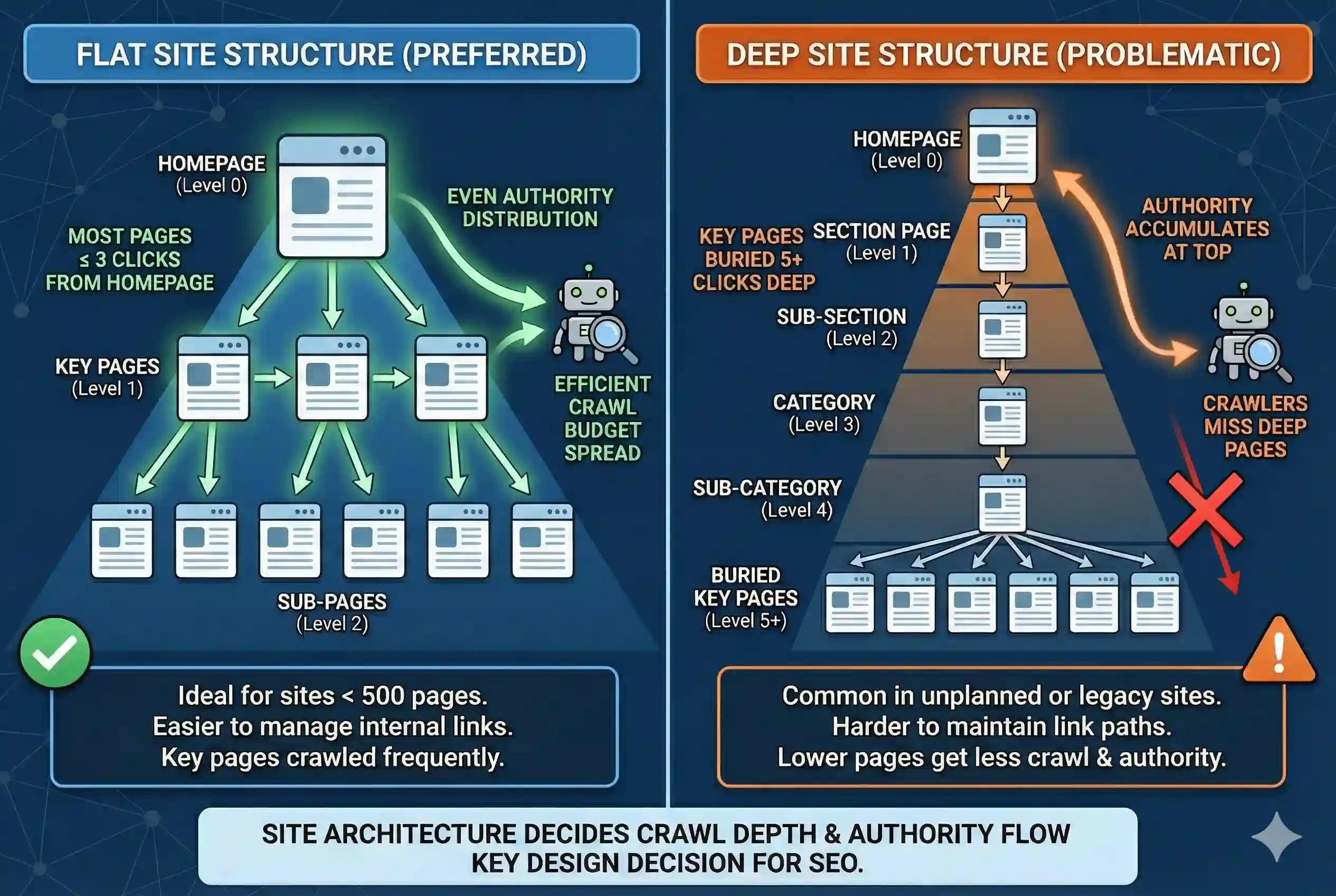
Site architecture is how your pages are organized and connected. It decides how many clicks it takes to get from your homepage to any other page. That number matters to search engines.
Google’s crawlers follow links. The more clicks a page is from the homepage, the less often it gets crawled and the less authority it carries. Keeping key pages within 3 clicks of the homepage is a widely cited crawl efficiency benchmark.
See the Backlinko Technical SEO Guide for a detailed breakdown of crawl budget and site depth.
Flat vs. Deep Site Structures: What Search Engines Prefer
Flat Structure | Deep Structure |
Most pages within 3 clicks of homepage | Key pages buried 5+ clicks deep |
Crawl budget spread across all pages | Crawlers may miss deep pages entirely |
Authority distributes more evenly | Top pages accumulate authority; lower pages do not |
Easier to manage internal links | Harder to maintain link paths over time |
Preferred for sites under 500 pages | Common in unplanned or legacy site builds |
URL Structure as a Design Decision
Your URL structure should mirror your content hierarchy. A page about SEO services under a broader services section should sit at /services/seo/, not at /seo-services-page-3/.
Set descriptive, keyword-relevant slugs before any content is published. Changing URLs after indexing requires 301 redirects, and even then, some authority is lost in the transition.
Canonical tags belong in this conversation too. If your CMS generates multiple URLs for the same content, such as filtered views or paginated archives, canonical tags tell Google which version to index. Set them during development, not after duplicate content issues appear in Search Console.
Building Internal Links into Your Site Structure from the Start
Internal links do two things. They help users move between pages, and they tell search engines how pages relate to each other. A link from a high-traffic page to a lower-traffic one passes some of that page’s authority along.
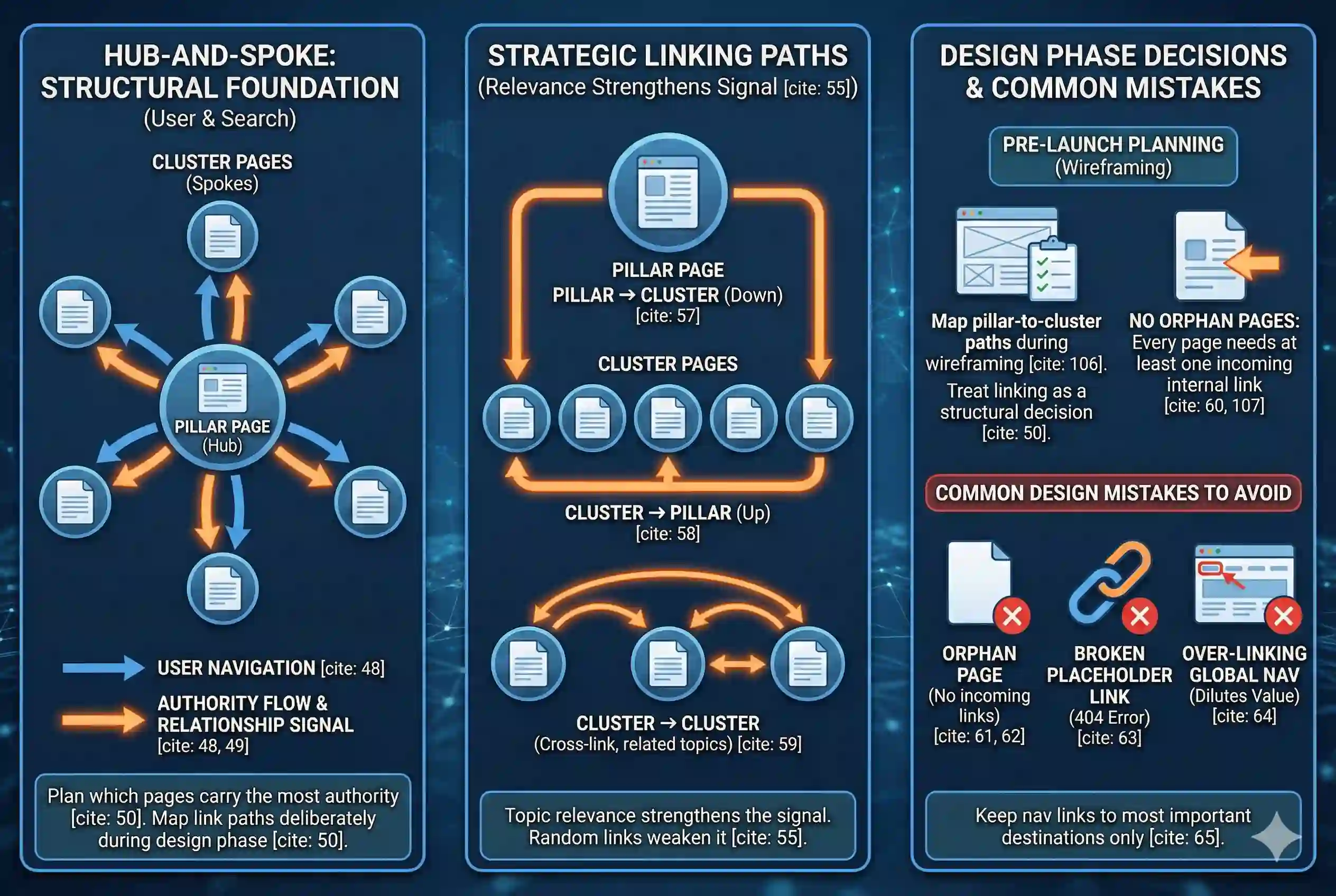
When you treat linking as a structural decision during the design phase, you can plan which pages should carry the most authority and map the link paths deliberately.
How Internal Links Pass Authority Through Your Site
Think of your site as a network. Your homepage and key hub pages accumulate authority from external links. Internal links then carry portions of that authority to the pages you point them toward.
In a well-planned site, pillar pages link to cluster pages. Cluster pages link back to pillars. Topic relevance between linked pages strengthens the signal. Random links from unrelated pages weaken it.
Hub-and-spoke linking model
- Pillar page (e.g., /seo-services/) links down to cluster pages
- Cluster pages (e.g., /technical-seo-web-design-foundations/) link back up to pillar
- Cluster pages cross-link to each other when topics are related
- No page on the site should exist without at least one internal link pointing to it
Common Internal Link Mistakes Made During the Design Phase
- Orphan pages: pages published with no internal links pointing to them. Google may never find them.
- Broken placeholder links: template or staging pages left live with dummy links that return 404 errors.
- Over-linking in global navigation: every link in your nav dilutes the value passed to any single page. Keep nav links to your most important destinations only.
Creating and Submitting an XML Sitemap That Search Engines Can Use
An XML sitemap is a file that lists the pages on your site you want search engines to index. It is not a guarantee of indexing, but it speeds up discovery, particularly for new sites or pages with few inbound links.
For a full breakdown of sitemap structure and submission, the SEMrush Technical SEO Checklist is a reliable reference.
The sitemap belongs in your pre-launch checklist, not your post-launch maintenance list.
What Goes in an XML Sitemap (and What Should Not)
Include | Exclude |
Canonical versions of all key pages | Admin or login pages |
Category and service pages | Thank-you or confirmation pages |
Blog posts and articles | Paginated archive pages (use canonical instead) |
Landing pages you want indexed | Pages with noindex tags |
Any page you want Google to prioritize | Duplicate or near-duplicate URLs |
How to Submit Your Sitemap and Confirm It Is Being Read
- Generate your sitemap: most CMS platforms do this automatically. For WordPress, a plugin like Yoast or Rank Math handles it. For custom builds, generate sitemap.xml during development.
- Submit via Google Search Console: go to Settings, then Sitemaps, and enter the sitemap URL (typically /sitemap.xml).
- Check the coverage report: after submission, Search Console shows how many pages were discovered versus indexed. Errors or warnings here point to specific problems to fix.
- Update the sitemap when new pages go live: automate this in your CMS where possible so the sitemap stays current without manual work.
Schema Note for Developers
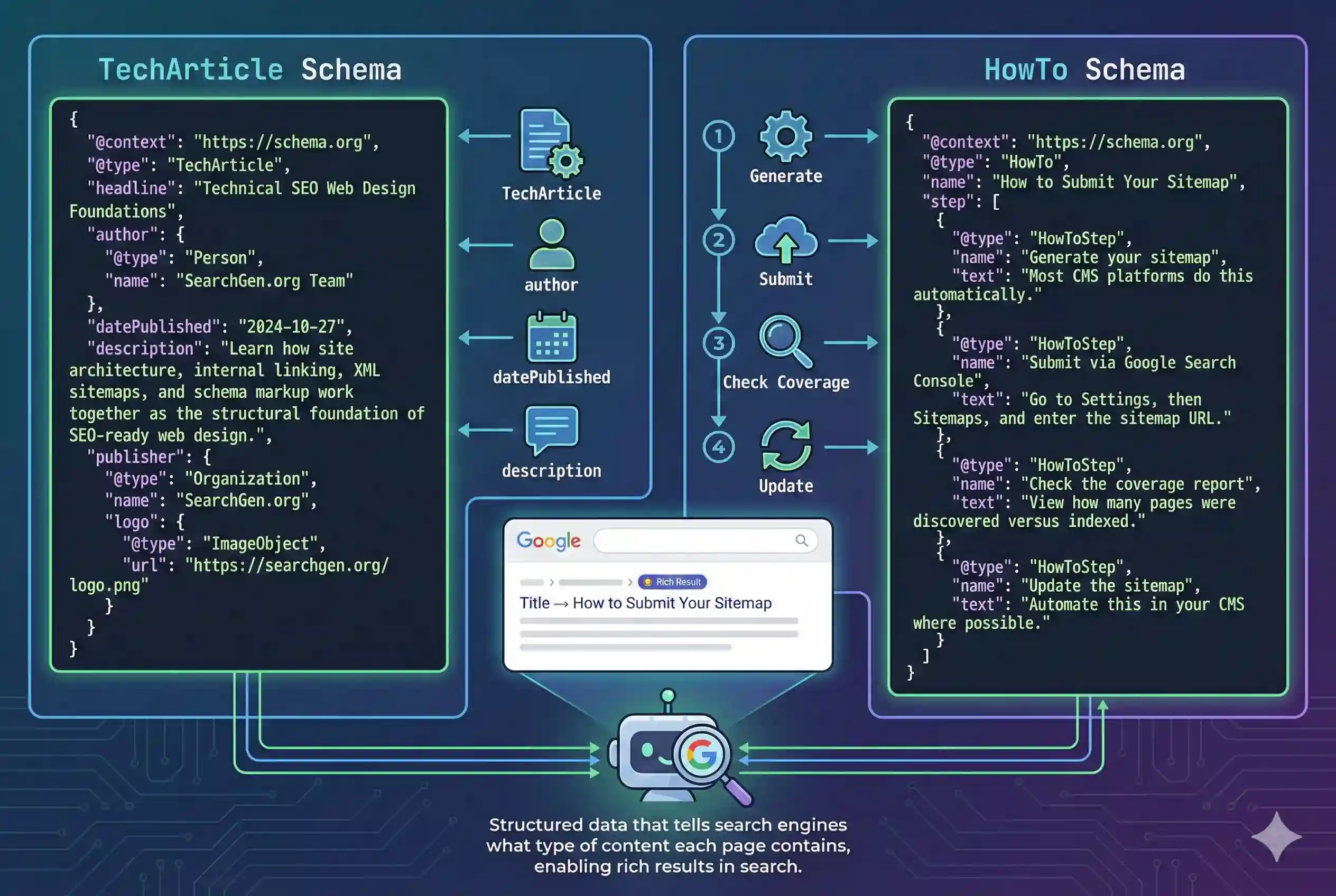
The 4-step sequence above qualifies for HowTo schema markup. Each step maps to a HowTo step object with a name and text property. Apply this alongside the TechArticle schema already declared for this page. Use Google’s Rich Results Test to confirm both schemas are parsed without errors after deployment.
Using Schema Markup to Tell Search Engines What Your Page Is About
Schema markup is structured code added to a page that describes its content to search engines. Without it, Google infers meaning from your text. With it, you tell Google directly what type of page it is looking at, who wrote it, and what the content covers.
Schema is read by AI-powered search features, including Google’s AI Overviews. Pages with clear structured data are more likely to be extracted and cited in those results.
TechArticle Schema: What It Is and When to Use It
TechArticle is a schema type for technical documentation, guides, and developer-oriented content. It is the correct type for this page and for any page on your site that explains a technical process or concept.
Required fields for TechArticle: headline, author, datePublished, and description. Optional but recommended: image, url, and publisher.
HowTo Schema: When Your Steps Qualify for Rich Results
HowTo schema applies when your content includes ordered, discrete steps that walk a reader through completing a task. It does not apply to general advice or explanations.
When Google displays HowTo rich results in search, the steps appear directly in the search listing. That increases visibility before anyone clicks.
TechArticle Schema | HowTo Schema |
Use for: technical guides and references | Use for: step-by-step task instructions |
Trigger: page explains a technical topic | Trigger: page walks through a process with steps |
Required: headline, author, datePublished | Required: name, step (each with name + text) |
This page qualifies | Sitemap submission steps section qualifies |
Signals page type to AI search engines | Eligible for rich results in Google Search |
What to Lock In Before Your Site Goes Live
Technical SEO decisions made during the design phase are cheaper to get right than to fix later. The following actions cover the four structural areas this page has walked through.
Pre-Launch Technical SEO Checklist
- Site architecture: Key pages reachable within 3 clicks of the homepage
- URL structure: Descriptive, keyword-relevant slugs set before any content is published
- Canonical tags: Applied to any page where duplicate URLs could be generated
- Internal links: Pillar-to-cluster and cluster-to-pillar paths mapped during wireframing
- Orphan pages: Every page on the site has at least one internal link pointing to it
- XML sitemap: Generated and submitted to Google Search Console at or before launch
- TechArticle schema: Applied to this page and any technical guide on the site
- HowTo schema: Apply to the sitemap submission steps section, steps are ordered and task-specific
Getting these decisions right before launch does not guarantee high rankings. Skipping them creates technical debt that makes every other SEO effort harder to execute. Architecture, linking, sitemaps, and schema are the structural layer. Everything else builds on top of them.