


Most web design projects treat SEO as a final checklist item. A designer finishes the layout, a developer builds it out, and then someone reviews the title tags. By that point, the URL structure is set, the heading hierarchy is locked into the CMS, and fixing the gaps requires rebuilding work that is already done.
Marketers who own web design projects need a workflow that prevents this. Not a set of SEO tips to apply at the end, a structured sequence that puts SEO decisions at the right phase, in the right order, so they do not have to be undone.
Marketers who apply this sequence before any wireframe is produced avoid the most common causes of post-launch SEO rework, redirect chains from URL changes, missing on-page fields in CMS templates, and Core Web Vitals failures baked into the design.
This page defines that workflow in six phases. Each phase names the specific SEO actions required, the checkpoints to confirm before moving forward, and the tools that belong at each stage.
Why Marketers Need to Own the SEO Web Design Workflow
Developers build what they are briefed to build. Designers solve visual problems. Neither role is accountable for keyword targeting, page intent alignment, or internal link structure, unless a marketer defines those requirements before the project starts.
A marketer-specific workflow integration approach means the marketer sets the SEO requirements as inputs to design and development, not outputs to review after the fact. This shifts SEO from a post-launch audit into a build requirement.
Three things break when marketers are not in the workflow early:
- URL structures get built without keyword logic and cannot be changed after launch without creating redirect chains
- Heading hierarchies get designed for visual effect rather than search intent, requiring manual corrections page by page
- Internal link placement gets determined by layout, not by the SEO authority structure the site needs
Search engine optimized web design is not a design style. It is a set of structural decisions that determine how search engines read, crawl, and rank a site. Marketers are the only role with the context to make those decisions correctly from the start.
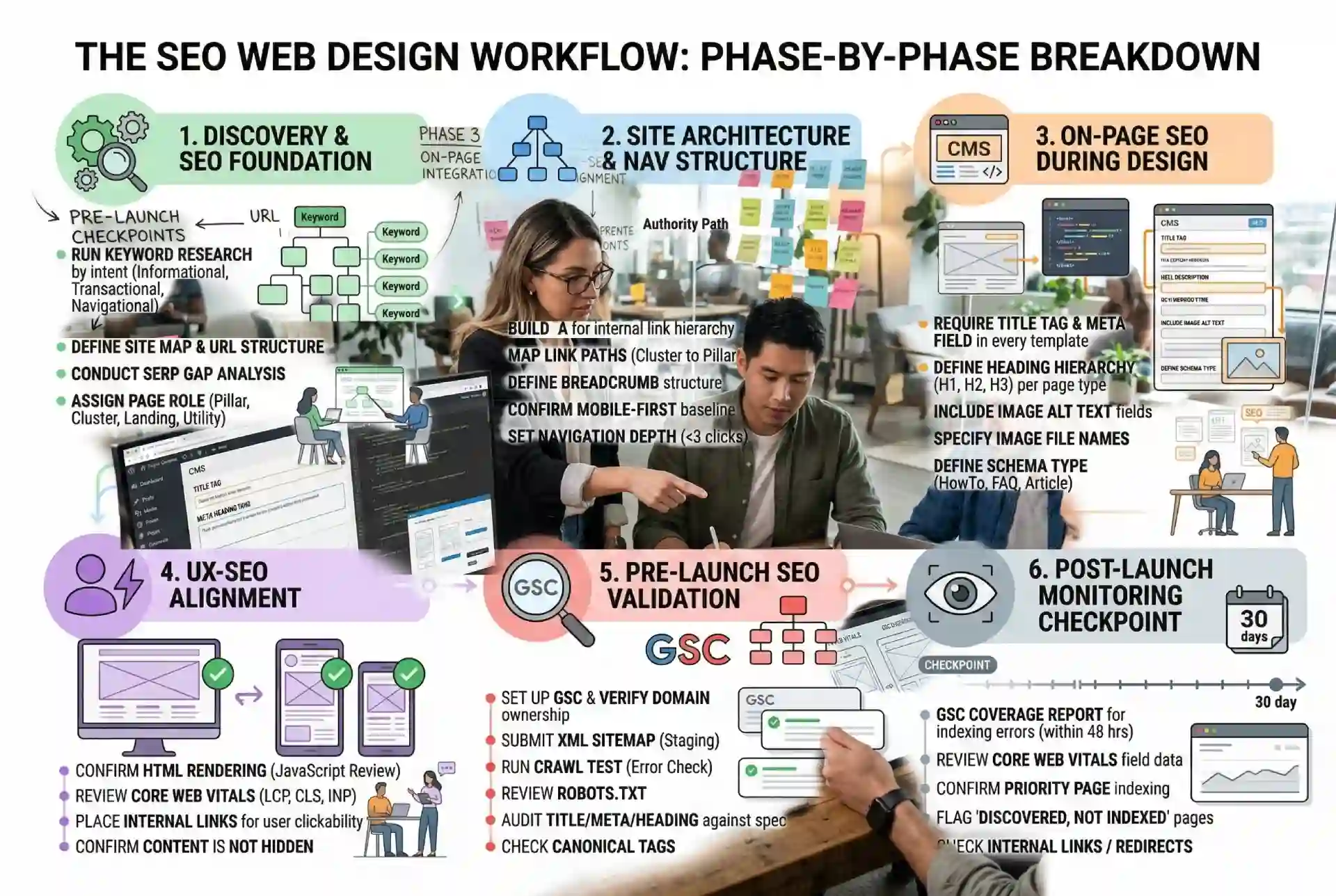
The SEO Web Design Workflow: Phase-by-Phase Breakdown
Phase 1: Discovery and SEO Foundation
Set the SEO requirements before any design or development work begins. This phase produces the inputs that every subsequent phase depends on.
- Run keyword research tied to page intent: informational, transactional, or navigational
- Define the site map and URL structure based on keyword targeting, not content availability
- Conduct SERP gap analysis to identify content types and formats that outperform competitors
- Assign a page role to every page: pillar, cluster, landing, or utility
- Document the primary keyword, secondary keywords, and intent for each page before design begins
Phase 2: Site Architecture and Navigation Structure
Translate the SEO foundation into a structure that search engines can crawl and users can navigate. Decisions made in this phase determine how authority flows across the site.
- Build the information architecture to reflect the internal link hierarchy defined in Phase 1
- Map internal linking paths from cluster pages to pillar pages before any layouts are produced
- Define the breadcrumb structure for category and subcategory pages
- Confirm mobile-first structure as the baseline, since Google indexes the mobile version of a site first
- Set navigation depth: no page that needs to rank should sit more than three clicks from the homepage
Phase 3: On-Page SEO Integration During Design
This is where on-page SEO integration enters the design process. Every template produced in this phase must include the SEO fields as build requirements, not optional additions.
- Require title tag and meta description fields in every CMS page template before any content is written
- Define the heading hierarchy (H1, H2, H3) per page type in the design spec
- Include image alt text fields in every image component in the CMS
- Specify the file naming convention for images based on keyword targets
- Define the schema markup type for each page type: HowTo, FAQ, Article, Product, or Local Business
- Build internal link placements into the layout; position them in body content, not just navigation
Phase 4: UX-SEO Alignment
Design decisions affect how search engines read a page. This phase aligns visual design choices with SEO requirements before development begins.
- Confirm that navigation menus and internal links use standard HTML, not JavaScript-rendered elements that crawlers cannot follow
- Review which design elements could cause layout shift, a Core Web Vitals signal, and adjust before build
- Select images and media based on file size targets that support the page speed requirements tied to Core Web Vitals
- Place internal links in positions where users are likely to click, which also signals topical relevance to search engines
- Confirm that the layout does not hide content behind tabs or accordions that crawlers may not index
Phase 5: Pre-Launch SEO Validation
Before any page goes live, run a structured SEO validation process. Google Search Console is the primary tool for this phase.
- Set up the Google Search Console property and verify domain ownership before launch
- Submit the XML sitemap through Google Search Console once the site is on the staging environment
- Run a crawl test to check for redirect errors, broken internal links, and duplicate URLs
- Review robots.txt to confirm no pages that need to be indexed are blocked
- Audit title tags, meta descriptions, and heading structure on every page type against the spec from Phase 3
- Check that canonical tags are set correctly on all paginated or duplicate-content pages
Phase 6: Post-Launch Monitoring Checkpoint
Launch is not the end of the workflow. The first 30 days after launch require active monitoring to confirm the site is being indexed and performing as expected.
- Check the Google Search Console Coverage report for indexing errors within 48 hours of launch
- Review Core Web Vitals field data once real user data starts populating in Google Search Console
- Confirm that priority pages (pillar pages and high-intent landing pages) have been crawled and indexed
- Flag any pages with a “Discovered but not indexed” status for review and resubmission
- Check that internal links are resolving correctly and no redirect chains have been created during launch
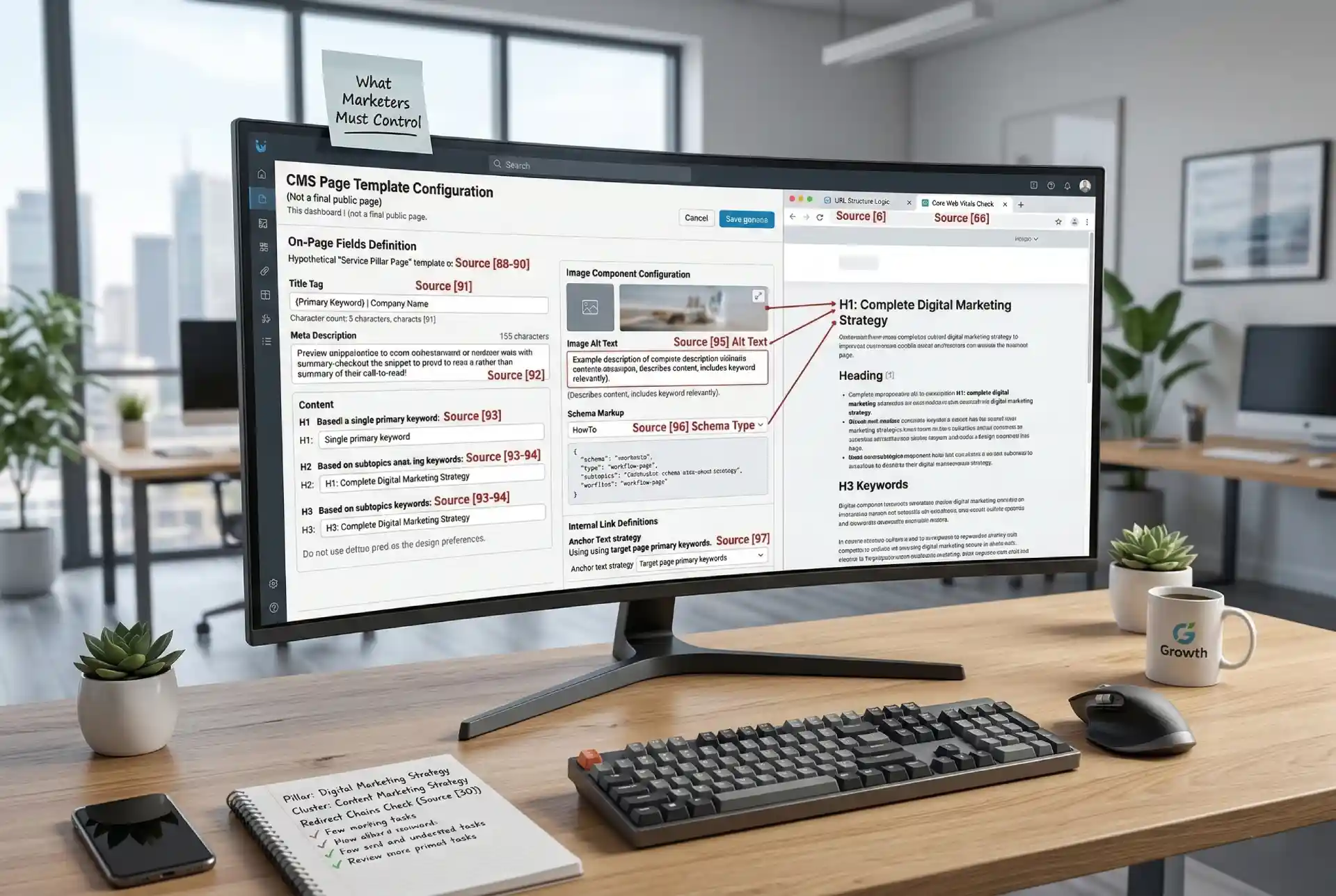
On-Page SEO Integration: What Marketers Must Control
On-page SEO does not happen automatically when a site is built. Each of the following elements must be defined by the marketer and built into the CMS template in Phase 3. If they are not in the template, they will not be filled in consistently.
On-Page SEO Checklist
Every page type in the CMS must include:
- Title tag: unique per page, includes the primary keyword, stays within 60 characters
- Meta description: matches page intent, includes primary keyword, written as a call to read rather than a summary
- H1: one per page, matches the primary keyword and the page’s search intent
- H2 and H3 headings: structured around supporting keywords and subtopics, not visual design preferences
- Image alt text: describes the image content and includes a keyword where relevant, without forcing it
- Schema markup: the correct schema type is applied per page — HowTo for workflow pages, FAQ for Q&A sections, Article for editorial content
- Internal links: anchor text matches the target page’s primary keyword, not generic phrases like ‘click here’
UX-SEO Integration: Design Decisions That Affect Rankings
Designers make decisions that affect search performance without knowing it. The marketer’s job in Phase 4 is to review the design against these SEO criteria before any development work begins.
JavaScript Rendering
Navigation menus, internal links, and content loaded through JavaScript may not be crawled by search engines. Any link that a crawler needs to follow internal links, navigation, breadcrumbs, and must render in standard HTML. Ask the development team to confirm crawlability before build.
In the design review, identify any navigation element, internal link, or content block that requires a click or scroll to load, and flag it for crawlability confirmation before the development sprint begins.
Core Web Vitals and Design
Core Web Vitals measure how a page performs for real users. Three signals are relevant at the design stage:
- Largest Contentful Paint (LCP) measures how fast the largest visible element loads. Heavy hero images and unoptimized fonts slow LCP.
- Cumulative Layout Shift (CLS) measures visual stability. Elements that move as the page loads banners, late-loading images without reserved space, create layout shift.
- Interaction to Next Paint (INP) measures responsiveness. Excessive JavaScript and heavy third-party scripts increase INP.
Marketers should flag these signals in the design review. The goal is not to resolve the technical issues but to identify design choices that will cause performance problems and change them before development begins.
Mobile-First Design
Google uses the mobile version of a page to index and rank it. A design that works on desktop but breaks the content hierarchy on mobile, hiding H2 sections, collapsing internal links into hamburger menus, or loading different content on mobile will hurt rankings. The mobile layout must be treated as the primary layout, not an afterthought.
In Phase 4, review the mobile wireframe alongside the desktop wireframe and confirm that all H2 sections, internal links, and body content are fully visible on the mobile layout without requiring a tap to expand or reveal.
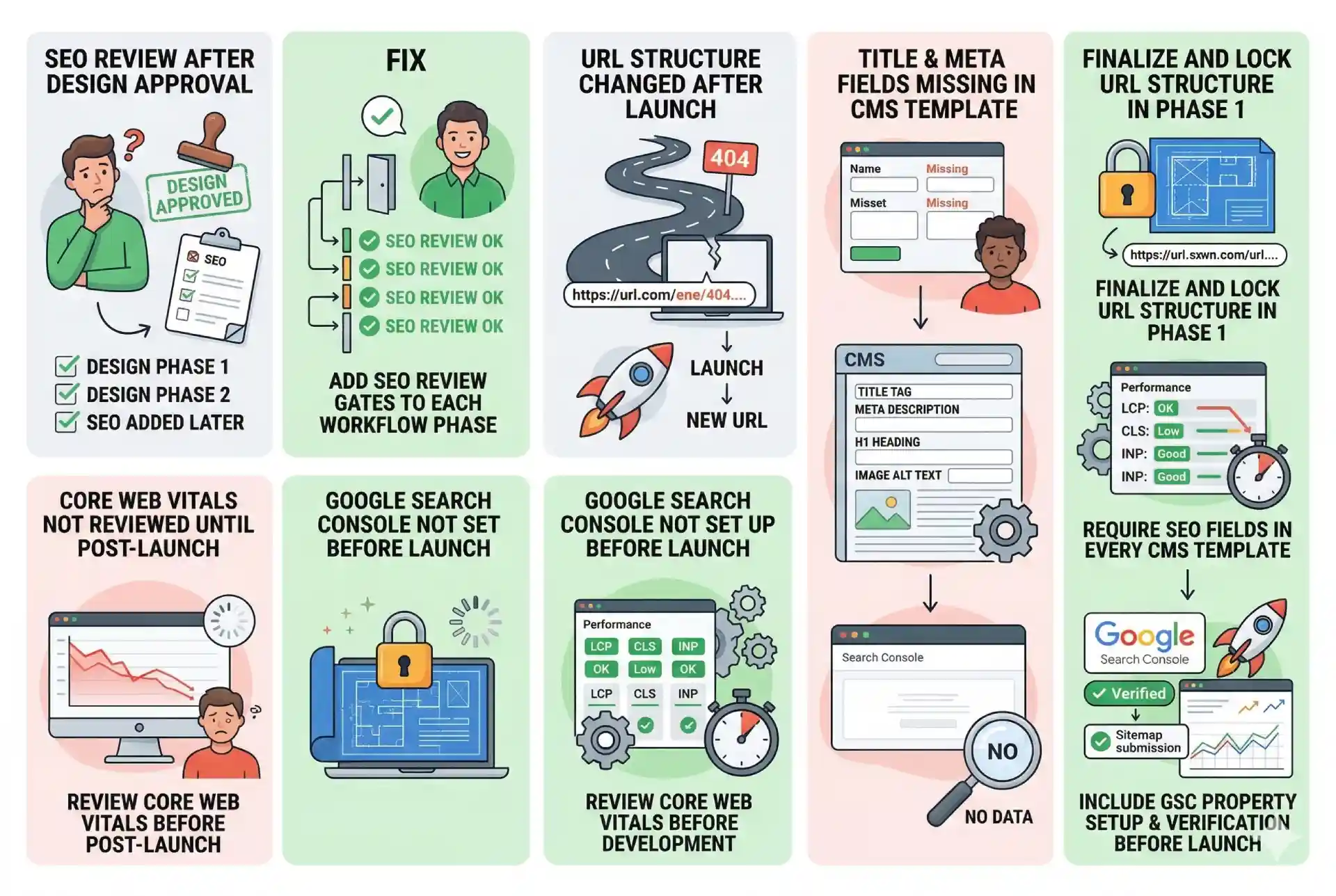
Common SEO Web Design Workflow Failures and How to Fix Them
Problem-Solution Reference
Failure | Fix |
SEO reviewed only after design is approved | Add SEO review gates to each workflow phase before the next phase begins |
URL structure changed after launch | Finalize and lock the URL structure in Phase 1 before any development work starts |
Title tag and meta fields not in the CMS template | Require SEO fields in every CMS template as a build specification in Phase 3 |
Core Web Vitals not reviewed until post-launch | Review Core Web Vitals as a design checkpoint in Phase 4, before development |
Google Search Console not set up before launch | Include GSC property setup and verification as a required step in Phase 5 |
Strategic Takeaway
An SEO web design workflow gives marketers a repeatable system for building sites that rank from day one. The difference between a site that ranks and one that needs post-launch SEO work usually comes down to when SEO entered the project. Early means it is built in. Late means it is bolted on.
The six-phase workflow in this guide puts SEO at the right phase, with the right actions, in the right order. Discovery sets the structure. Design reflects the SEO requirements. Validation confirms the build. Monitoring catches what slips through.
For the broader context on how search engine optimized web design works as a discipline, see the SearchGen guide to SEO web design. For the technical SEO elements that go deeper than the marketer’s checklist, refer to the technical SEO for web design resource. For mobile-specific workflow requirements, the mobile-first web design checklist covers the design and development decisions that affect how Google indexes the mobile version of your site.