

Search engine performance is no longer decided by content alone. Since Google made Core Web Vitals part of its Page Experience signal, the design decisions a web designer makes on every project now have a direct path to search visibility. For web designers working with clients in the Philippines, this means that the fonts you load, the way you size your hero images, and the JavaScript your interactive elements depend on all feed into three scores Google tracks for every page.
This guide covers what each metric measures, which design decisions move those scores, how to run a Lighthouse audit, and what actions to take on the results.
What Are Core Web Vitals and Why They Matter for Web Design in the Philippines
Core Web Vitals are three metrics Google uses to evaluate user experience across loading speed, interactivity, and visual stability. Google measures each metric at the 75th percentile of page loads, meaning at least 75% of real visits to a page must hit the “Good” threshold for that page to pass. A page that fails even one metric is classified by that failing score, regardless of how well it performs on the other two.
Metric | What It Measures | Good Threshold | Poor Threshold |
LCP | Time for the largest visible element to load | Under 2.5 seconds | Over 4 seconds |
INP | Responsiveness to clicks, taps, and key presses | Under 200 milliseconds | Over 500 milliseconds |
CLS | Amount of unexpected layout shift during load | Under 0.1 | Over 0.25 |
Source: Google Search Central, developers.google.com/search/docs/appearance/core-web-vitals
How Core Web Vitals Scores Affect Search Performance and Rankings
The Page Experience Signal: How Google Uses Core Web Vitals in Ranking
Google includes Core Web Vitals as part of its Page Experience ranking signal. They are not the dominant factor, and content relevance still leads. However, when multiple pages compete on similar content quality, CWV scores become a differentiator. Sites that pass all three thresholds have a measurable edge in those situations.
“Good,” “Needs Improvement,” and “Poor” Thresholds Explained
Each metric has three bands. A page sits in “Good” when 75% of its real page loads hit the target score. It moves to “Needs Improvement” when the score falls between the Good and Poor boundaries, and to “Poor” when it crosses the upper limit. A page’s overall CWV status is set by its worst-performing metric.
What Happens When Most Page Views Fall Outside the “Good” Range
A page that fails on even one metric carries that label into Google Search Console’s Core Web Vitals report. The report groups URLs by issue type and flags them as needing attention. Pages in the “Poor” band are deprioritized relative to passing competitors when all other signals are equal.
Design Decisions That Directly Affect LCP Scores
LCP measures how long it takes for the largest visible element on the page to finish loading. For most websites, that element is a hero image, a large headline block, or a video poster frame. The design choices around those elements are the primary levers a web designer controls.
Hero Images: Format, Size, and Preload Decisions
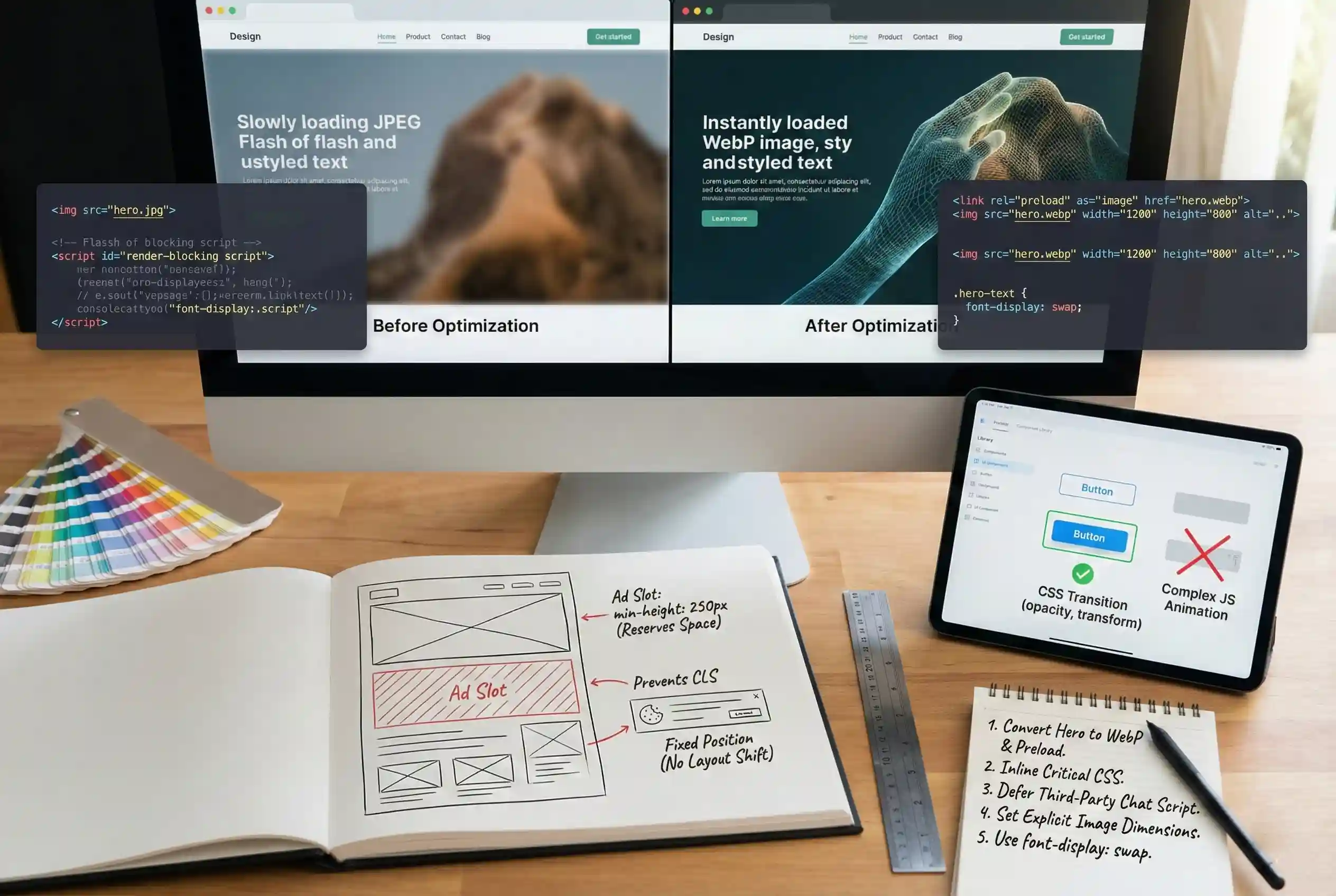
An unoptimized hero image is the most common cause of a slow LCP score. Convert hero images to WebP format to reduce file size without visible quality loss. Set explicit width and height attributes in the HTML so the browser reserves space before the image loads. Add a preload hint for the hero image in the page head so the browser fetches it early, before it processes the full HTML.
Web Font Loading: Choosing Between FOIT, FOUT, and Font-Display Swap
Custom web fonts block text rendering until they download. FOIT (Flash of Invisible Text) hides text until the font arrives, which delays the LCP element if that element is a text block. Using font-display: swap in your CSS lets the browser show a system fallback font first and swap in the custom font once it loads. This keeps text visible during load and avoids contributing to a slow LCP.
Above-the-Fold Layout: Minimizing Render-Blocking Resources
CSS and JavaScript files that load in the page head block rendering until the browser finishes parsing them. Audit your above-the-fold layout and defer any scripts that are not needed for the initial render. Inline critical CSS for above-the-fold styles rather than loading a full stylesheet before the page paints.
Design Decisions That Directly Affect INP Scores
INP measures how quickly a page responds to user interactions throughout the full session, not just on first load. It tracks clicks, taps, and key presses. A slow INP score usually means JavaScript is taking too long to process those events before the page visually responds.
Third-Party Scripts and Widgets: When to Defer or Remove
Chat widgets, social share buttons, tag manager scripts, and ad pixels all add JavaScript that runs on the main thread. Each one competes with interaction handlers when a user clicks or taps. Defer any third-party script that does not need to run before the page is interactive. Remove scripts that are not actively used.
Animation and Interaction Design: Keeping JavaScript Execution Lean
CSS animations that run on the compositor thread (using transform and opacity) do not block the main thread and are safe for INP. JavaScript-driven animations that trigger layout recalculations on every frame are not. When designing interactive elements, prefer CSS transitions over JavaScript-based animation libraries. Keep event handlers short: do the minimum work on click or tap, and defer heavier tasks.
Design Decisions That Directly Affect CLS Scores
CLS measures unexpected layout shifts. A layout shift happens when a visible element moves after the initial render without a user triggering it. A score above 0.1 indicates that content is jumping around during load, which breaks the reading and interaction experience.
Image and Video Dimensions: Always Set Width and Height Attributes
When a browser encounters an image element without explicit dimensions, it does not know how much space to reserve until the image file downloads. The result is a layout shift as surrounding content jumps to make room. Set width and height attributes on every image and video element, or use the aspect-ratio CSS property to lock the space before the asset loads.
Ad and Embed Slots: Reserving Space Before Content Loads
Ad units and embedded content (maps, videos, social posts) load asynchronously and push other content down when they appear. Define a minimum height for every ad or embed container in your CSS so the space is reserved before the content arrives. This prevents the surrounding layout from shifting.
Dynamic Content Insertion: Avoiding Layout Shifts From Below-the-Fold Injections
Content injected after load by JavaScript, such as banners, cookie notices, or lazy-loaded sections, causes layout shifts if it inserts above existing content. Place dynamic content below the current viewport or design it to overlay without displacing other elements. Cookie consent banners should use fixed positioning so they do not push the page layout.
How to Audit Core Web Vitals Using Google Lighthouse
Google Lighthouse runs a simulated page load and reports LCP, INP, and CLS scores along with a list of specific issues ranked by impact. It is available directly inside Chrome DevTools at no cost. Running a Lighthouse audit before and after each design change is the fastest way to verify whether a change improved or hurt performance.
How to Run a Lighthouse Audit in Chrome DevTools
- Open Chrome DevTools. Right-click anywhere on the page and select Inspect, or press F12. Navigate to the Lighthouse tab at the top of the DevTools panel.
- Set the audit configuration. Select the Performance category. Set the device toggle to Mobile, since Google’s Core Web Vitals ranking signals are based on mobile performance.
- Run the audit. Click Analyze Page Load. Lighthouse will reload the page, simulate a mobile connection, and generate a performance report. This takes 30 to 60 seconds.
- Read the Core Web Vitals scores. At the top of the report, find the LCP, INP, and CLS scores with color indicators: green for Good, orange for Needs Improvement, red for Poor.
- Action the Opportunities list. Scroll to the Opportunities section. Each item shows the potential time saving from fixing that issue. Start with the highest-impact items that relate to your design elements: image sizes, render-blocking resources, and layout shift sources.
How to Use the Core Web Vitals Report in Google Search Console
Google Search Console shows field data from real users visiting your site, not a simulated test. Open the Core Web Vitals report under Experience in the left navigation. The report groups URLs by issue and shows which pages are Poor, Need Improvement, or Good for LCP, INP, and CLS. Use this report to prioritize which pages to audit with Lighthouse first.
Core Web Vitals Optimization Checklist for Web Designers
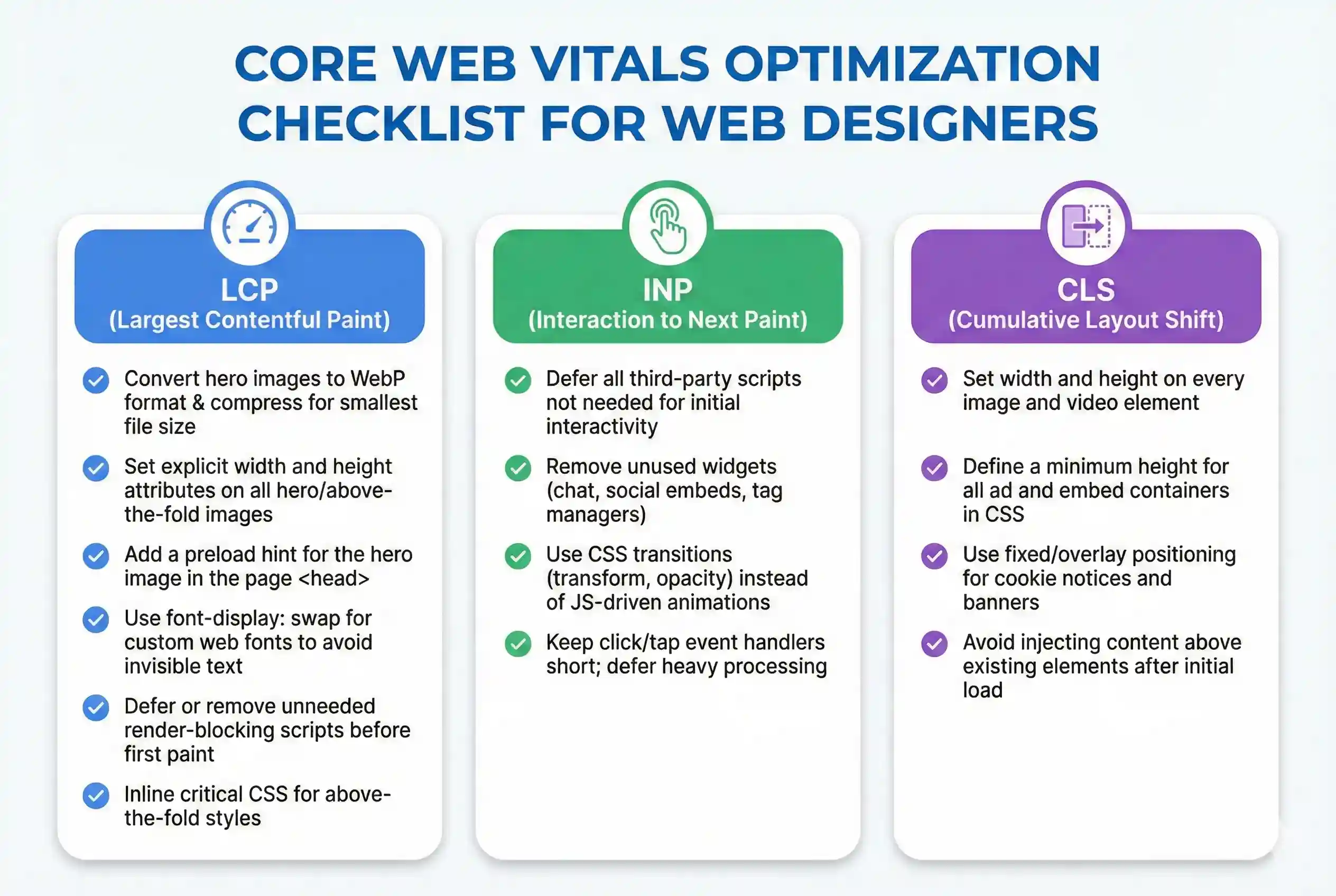
LCP Checklist
- Convert hero images to WebP format and compress to the smallest file size that maintains acceptable quality.
- Set explicit width and height attributes on all hero and above-the-fold images.
- Add a preload hint for the hero image in the page <head>.
- Use font-display: swap for all custom web fonts to prevent invisible text during load.
- Defer or remove render-blocking scripts that are not needed before the page first paints.
- Inline critical CSS for above-the-fold styles instead of loading a full external stylesheet.
INP Checklist
- Defer all third-party scripts that do not need to run before the page is interactive.
- Remove unused third-party widgets including any chat plugins, social embeds, or tag manager triggers not actively in use.
- Use CSS transitions (transform, opacity) instead of JavaScript-driven animations to keep the main thread free.
- Keep click and tap event handlers short. Move heavy processing off the main thread or defer it after the interaction response.
CLS Checklist
- Set width and height on every image and video element so the browser reserves space before the asset downloads.
- Define a minimum height for all ad and embed containers in your CSS before the content loads.
- Use fixed or overlay positioning for cookie notices and banners so they do not push the page layout.
- Avoid injecting content above existing page elements after the initial load using JavaScript.
Strategic Takeaway: Performance Is a Design Responsibility
Core Web Vitals are not a developer-only concern. Every design decision that affects what loads above the fold, how fonts render, how images are sized, or how interactive elements respond has a direct path to LCP, INP, and CLS scores. Web designers who treat performance metrics as a design constraint, and not an afterthought, ship sites that rank better and hold users longer.
Start with a Lighthouse audit on every project before handoff. Fix the top three Opportunities items, then verify the scores in Google Search Console once the site has real traffic. For a broader look at how performance fits into search engine optimized web design, see the SearchGen guide to SEO-optimized web design.
Frequently Asked Questions